Hello All,
Hope you're enjoying the world around you.
Surprised?? I know; after a long time, I am here writing a tutorial on BlackBerry application development. It is a requested tutorial, asked for by some developers a few days back. So here it is:
Note: This tutorial is a part of a series of my tutorials on BlackBerry application development; so far we have discussed the following.
Introduction:
My friend has a problem: He visits a site many times a day. Every time he has to open browser, type the site name or chose from favorites to see it. He asked, what if there is an icon on my home screen that directly open a browser and navigate to that particular site?" By doing this, i need just one tap, just one.
The solution is
Web Icon. How? I'm telling you next. First bring a cup of coffee or tea, whatever you like; I brought a cup of Qehwa (a local drink for winters) with two chocolates. Bryan adams is playing in background. Sit relax.
Here we go. A web icon is an application that launches a BlackBerry smartphone browser to a predefined web address. Web icons displayed in the list of BlackBerry smartphone applications and they can be used as shortcuts to a BlackBerry smartphone user's favorite websites.
Lets start. The first thing is to create a new class that extends from WebIcon. Here I'm dividing talk in two parts; Frist for the devices earlier to 4.0 and second, the part is for 4.1 and later.
1. BlackBerry Device Software earlier than 4.0
When using BlackBerry Device Software versions earlier than 4.0, the default browser is the only one that can be invoked;
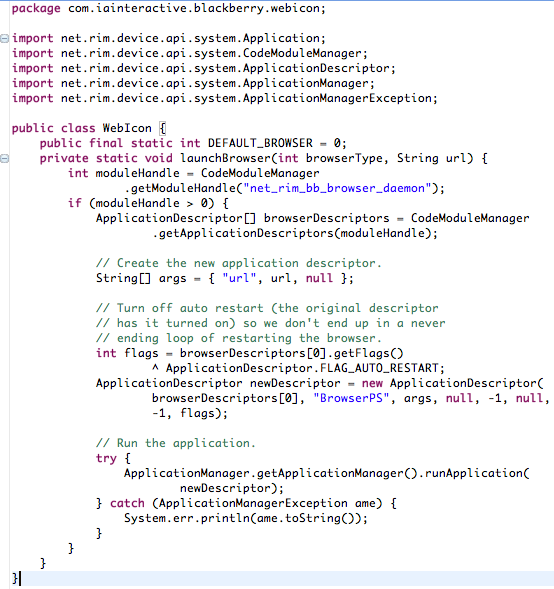
As an example, a new class called
BlackBerryWebIcon is created below that extends
WebIcon and points to
my blog, AasimNaseem.com; only three lines of code need to be added to the
main method of this new class.
 2. BlackBerry Device Software 4.0 and later
The previous sample can also be used for BlackBerry Device Software up to and including 4.2.1, although the following code samples offer a simpler methodology for allowing the web icon to invoke the default browser or invoke specific browsers on the BlackBerry smartphone.
A web icon may invoke either the default browser on the BlackBerry smartphone or the Internet Browser, the Wireless Application Protocol (WAP) Browser, the BlackBerry® Browser, the Wi-Fi® Browser, or the BlackBerry® Unite!™ Browser.
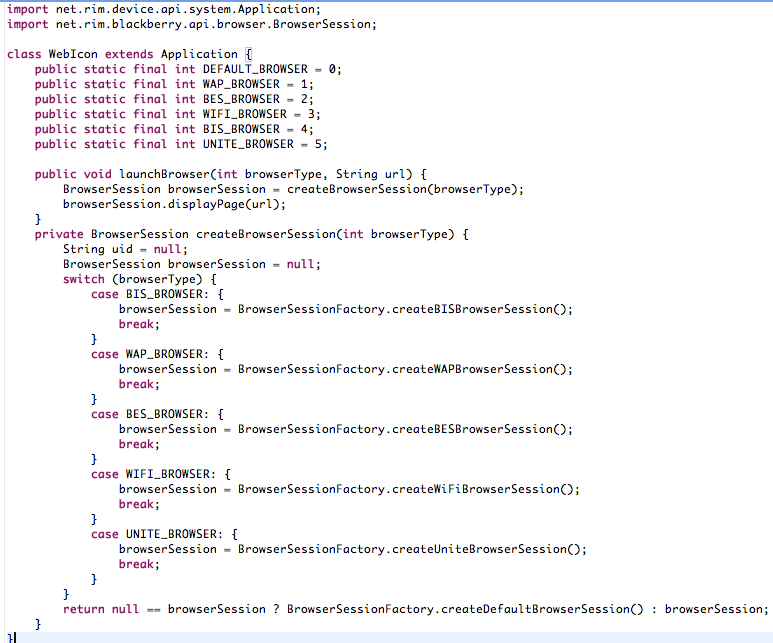
The following code creates a web icon that launches a browser to a specific web address for the given browser type; If the given browser type is not available, the web icon launches the default browser.
 Note:
Note: The previous code sample makes static calls to a factory class called
BrowserSessionFactory to create these different
BrowserSessions; One thing more ist that BlackBerry Device Software 4.2 may prevent the previous code sample from opening the default browser. As a workaround, add the following code after the call to the
displayPage method: This issue was resolved in BlackBerry Device Software 4.2.1;

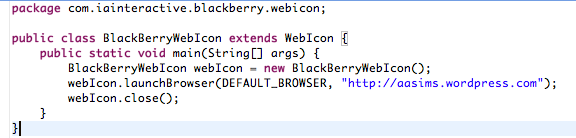
As an example, a new class called
BlackBerryWebIcon is created in the following sample that extends
WebIcon and points to
my blog, AasimNaseem.com;. Again, only three lines of code need to be added to this new class.
At this point we are get done with code; Thumbs up; Plus its time to change Bryan Adams. Let try some slow number of Richard Marx.
Alright, next is to set the title of your application, as this title will be appears on the Home screen of the smartphone user scrolls over the icon; To to this,
right-click the project, select
Properties and then select the
General tab. In this area, you can type the application title, vendor name and application description.
Done; ?? great; Now next is to add an application icon. This is the icon that displays on the Home screen of the BlackBerry smartphone. Do the following steps:
- Create an image approximately 32 x 32 pixels in size.
- Right-click the project, select Add File to Project, and then navigate to the custom icon.
- Once the file is added, right-click the file, and then select Properties.
- Select the check box for Use as Application Icon.
Congratulations. You have done it; isn't that simple?? Indeed it is; Make victory sign; Compile and deploy on your phone;
Feel free to throw queries incase you found a problem.
Have a nice time.
Happy Development;
source:
http://www.blackberry.com/knowledgecenterpublic/livelink.exe/fetch/2000/348583/800332/800440/How_To_-_Create_a_web_icon.html?nodeid=1487655&vernum=0

 AasimNaseem
Comments (20)
thumbs up for you dude.
well you are guro no doubt. dnt know how you move take different things parallel.
well done buddy. Keep it up bro :-)
Thank you,
M
Thanks
How do I remove a system menu item? lol, finally got the programs signed and running on my phone. There were some other tutorials that I also followed. Here is the link to the tutorials:
http://www.blackberrycool.com/2009/07/16/how-to-write-a-blackberry-application-lesson-3-create-shortcuts-and-more/
My question is: How do I remove a system-wide menu Item? I'm going to keep digging but figured if you knew maybe you could help me.
Have a great New Years!
RB
Leave a Reply