Hello All ...
Hope enjoying most enjoyable activity .i.e development :) i love it ... really love it ..
Today i will try to explain something related to javascript event object. By using JavaScript, we have the ability to create dynamic web pages. Events are actions that can be detected by JavaScript.
Every element on a web page has certain events which can trigger a JavaScript. For example, we can use the onClick event of a button element to indicate that a function will run when a user clicks on the button. We define the events in the HTML tags.
Examples of events:
- A mouse click
- A web page or an image loading
- Mousing over a hot spot on the web page
- Selecting an input field in an HTML form
- Submitting an HTML form
- A keystroke
Note: Events are normally used in combination with functions, and the function will not be executed before the event occurs!
I will give you some example scripts for reading out event properties. There are very serious browser incompatibilities in this area.
As soon as we want to read out information about the event, we’re inundated by an immense amount of properties, most of which do not work in most browsers. See the
Event compatibility tables for a quick overview or the
W3C DOM Compatibility - Events page for a complete overview.
I am not going to give an alphabetical list of properties, since it wouldn’t help a bit to make you understand all this — the situation is too confusing. Instead I’ve written five scripts to ask five questions of the browser.
- What is the type of the event?
- Which HTML element is the target of the event?
- Which key was pressed during the event?
- Which mouse button was pressed during the event?
- What was the mouse position during the event?
Please note that in these scripts I’ve been very strict in my object detection. I first create cross-browser event access, then I check if the browser supports each individual property before using it.
What is the type of the event?
This is the only question with a true cross-browser answer: use the
typeproperty to read out the type:
[code language="javascript"]
function doSomething(e)
{
if (!e) var e = window.event; alert(e.type);
}
[/code]
Which HTML element is the target of the event?
W3C/Netscape says: the
target. No, says Microsoft, the
srcElement. Both properties return the HTML element the event took place on.
[code language="javascript"]
function doSomething(e) {
var targ;
if (!e) var e = window.event;
if (e.target) targ = e.target;
else if (e.srcElement) targ = e.srcElement;
if (targ.nodeType == 3) // defeat Safari bug
targ = targ.parentNode;
}
[/code]
The last two lines of code are especially for Safari. If an event takes place on an element that contains text, this
text node, and not the element, becomes the target of the event. Therefore we check if the target's
nodeType is 3, a text node. If it is we move to its parent node, the HTML element.
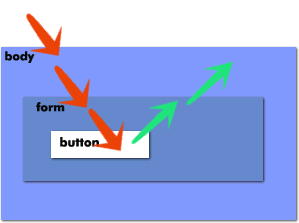
Even if an event
is captured or bubbles up, the target/srcElement always remains the element the event took place on.
Other targets
There are some more targeting properties. I discuss
currentTarget on the
Event order page and
relatedTarget,
fromElement and
toElement on the
Mouse events page.
Which key has been pressed?
This one is relatively easy. First get the code of the key (a = 65) from the
keyCode property.
When you’ve read out the key code, send it through the method
String.fromCharCode() to obtain the actual key value, if necessary.
[code language="javascript"]
function doSomething(e) {
var code;
if (!e) var e = window.event;
if (e.keyCode) code = e.keyCode;
else if (e.which) code = e.which;
var character = String.fromCharCode(code);
alert('Character was ' + character);
}
[/code]
There are some subtleties that may make the key events hard to use. For instance, the
keypress event fires as long as the user keeps the key pressed. However, in most browsers the
keydown event also keeps firing as long as the key is pressed. I’m not sure this is a good idea, but it’s what happens.
There are two properties for finding out which mouse button has been clicked:
which and
button. Please note that these properties don’t always work on a
click event. To safely detect a mouse button you have to use the
mousedown or
mouseup events.
which is an old Netscape property. Left button gives a value of 1, middle button (mouse wheel) gives 2, right button gives 3. No problems, except its meager support (and the fact that it’s also used for key detection).
Now
button has been fouled up beyond all recognition. According to W3C its values should be:
- Left button – 0
- Middle button – 1
- Right button – 2
According to Microsoft its values should be:
- Left button – 1
- Middle button – 4
- Right button – 2
No doubt the Microsoft model is better than W3C’s. 0 should mean “no button pressed”, anything else is illogical.
Besides, only in the Microsoft model button values can be combined, so that 5 would mean “left and middle button”. Not even Explorer 6 actually supports this yet, but in the W3C model such a combination is
theoretically impossible: you can never know whether the left button was also clicked.
In my opinion
W3C has made some serious mistakes in defining
button.
Right click
Fortunately you most often want to know if the right button has been clicked. Since W3C and Microsoft happen to agree on this one and give
button a value of 2, you can still detect a right click.
function doSomething(e) {
	var rightclick;
	if (!e) var e = window.event;
	if (e.which) rightclick = (e.which == 3);
	else if (e.button) rightclick = (e.button == 2);
	alert('Rightclick: ' + rightclick); // true or false
}
Please note that, although Macs have only one mouse button, Mozilla gives a Ctrl–Click a
button value of 2, since Ctrl–Click also brings up the context menu. iCab doesn’t yet support mouse button properties at all and you cannot yet detect a right–click in Opera.
Mouse position
As to the mouse position, the situation is horrible. Although there are no less than six mouse coordinates property pairs, there is no reliable cross–browser way to find the mouse coordinates relative to the document we need.
These are the six property pairs — see also the
Event compatibility tables or the
W3C DOM Compatibility - Events page.
- clientX,clientY
- layerX,layerY
- offsetX,offsetY
- pageX,pageY
- screenX,screenY
- x,y
I explained the problem, W3C’s vagueness and the use of
pageX/Y and
clientX/Y in my slightly outdated
Evolt article.
The
screenX and
screenY properties are the only ones that are completely cross–browser compatible. They give the mouse position relative to the entire computer screen of the user. Unfortunately this information is completely useless: you never need to know the mouse position relative to the screen — well, maybe only if you want to place another window at the mouse position.
The other three property pairs are unimportant. See the
W3C DOM Compatibility - Events page for a description.
Correct script
This is the correct script for detecting the mouse coordinates:
function doSomething(e) {
	var posx = 0;
	var posy = 0;
	if (!e) var e = window.event;
	if (e.pageX || e.pageY) 	{
		posx = e.pageX;
		posy = e.pageY;
	}
	else if (e.clientX || e.clientY) 	{
		posx = e.clientX + document.body.scrollLeft
			+ document.documentElement.scrollLeft;
		posy = e.clientY + document.body.scrollTop
			+ document.documentElement.scrollTop;
	}
	// posx and posy contain the mouse position relative to the document
	// Do something with this information
}
happy development :) have nice time ...

 AasimNaseem
Comments (2)
Leave a Reply