If you are getting this error message in your console while running your app on iPhone/iPod (specially on 1G, having ios < 3.2)
[code]
dyld: Symbol not found: _OBJC_CLASS_$_UIPopoverController
Referenced from: /var/mobile/Applications/5BC198AF-22AF-4581-8787-E267D359E059/FilesAnyWhere.app/<your_app_name>
Expected in: /System/Library/Frameworks/UIKit.framework/UIKit
in /var/mobile/Applications/5BC198AF-22AF-4581-8787-E267D359E059/FilesAnyWhere.app/<your_app_name>
<em>Data Formatters temporarily unavailable, will re-try after a 'continue'. (Not safe to call dlopen at this time.)</em>
<em>mi_cmd_stack_list_frames: Not enough frames in stack.</em>
<em>mi_cmd_stack_list_frames: Not enough frames in stack.</em>
[/code]
Above error is in
UIKit.framework, it can be in any library. You need to closely look into error and find out the library Name.
Following solution is for UIKit.framework; You can use same steps for any other library too;
Reason for this error;
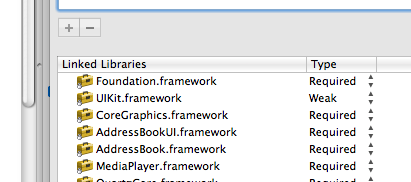
UIPopoverController class is available in iOS 3.2 and later; So linking this library as
Required for the device having OS < 3.2 will throw this error. By changing the link type to
Weak will ignore such libraries and your application will run;
Solution;
Do following things;
- check the iOS Deployment target in build section of info. It must be compatible with os version of your device;
- change the type of UIKit.framework library from Required to Week; You can do this from Project menu ->Edit Active Target "your_app_name" ->General (first section) and then linked libraries;
 Note:
Note:
You have to find work around for your program logic incase you make this library weakly linked; Might be some of your code will not be able to run where you use UIPopoverController class;

 AasimNaseem


Comments (3)
Leave a Reply