Hello Everyone;
Hows your developments going? Im sure you enjoy it as much as i do; Its really a fun;
Today's menu is related to iPhone Applications; We often notice that iPhone/iPod/iPad applications hangup or exit abnormally; It means the running application has been crashed due to some unknown reason; It really annoy the users and no one want to even use them; This thing also annoy the developers and they want to know the reason why it get crash at particular point;
In such scenarios, the device generates a log file that called crash report; It holds all the information about the reason that leads the application to crash; These reports are a vital developer's tool to help squash bugs and improve their software; The iPhone OS stores crash reports on the iPhone or iPod touch whenever an app crashes, and those get backed up whenever the device is synced with iTunes;
Steps to fetch crash reports (User End)
- Sync your iPhone to iTunes.
- Find the crash logs on your computer. Here is where they’re located;
- Mac OS X :
~/Library/Logs/CrashReporter/MobileDevice/<DEVICE_NAME>
- Windows XP:
C:\Documents and Settings\<USERNAME>\Application Data\Apple computer\Logs\CrashReporter/<DEVICE_NAME>
- Windows Vista\Windows 7::
C:\Users\<USERNAME>\AppData\Roaming\Apple computer\Logs\CrashReporter/MobileDevice/<DEVICE_NAME>
The log file names start with application name and have the extension “crash”; The logs themselves are just text files, so you can open them in your text editor and cut&paste, or (preferably) attach them to an email to sent to developers;
A typical crash report looks like this (if you open it in text editor)

Here
<application name> is the name of your application that crashed;
Steps to symbolicate crash Report; (Developer End)
Symbolication is a process of decoding the crash report to find out the exact class name and method name that creates problem;
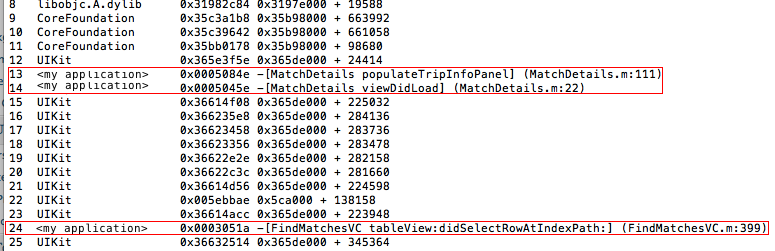
You can notice in above image that there were different thread that were running parallel and the 2nd line tells us which thread crashed; After decoding the crash report , you will go through that thread entries to find out your classes/method;
There is a script available in your mac machine for symbolication process; You can find that script at
/Developer/Platforms/iPhoneOS.platform/Developer/Library/Xcode/Plug-ins/iPhoneRemoteDevice.xcodeplugin/Contents/Resources/symbolicatecrash /usr/local/bin/
If you unable to find it, I have upload it at following url; unzip it and put at your preferable location;
http://dl.dropbox.com/u/18976202/symbolicatecrash.zip
Note: IT IS VERY IMPORTANT THAT YOU SAVE YOUR BINARY FILE (APP FILE) ALONG WITH dSYM FILE WHEN YOU SHIP YOUR APPLICATION; WITHOUT HAVING THESE FILES YOU ARE NOT ABLE TO DECODE THE CRASH REPORTS;
Its time to start symbolication;
- Copy your crash report, .app file and .dSYM file along with downloaded scrip (Put everything in one directory)
- Open your terminal and move to the directory where you copy download script;
- execute following commad
./symbolicatecrash -A -v <crashReportName> <dSYM file name>
for example if your application name is
myGame, then your binary file name would be
myGame.app and your dSYM file would be
myGame.app.dSYM.
The format of crash report name is as follow
applicationName_yyyy-mm-dd-hhmmss_deviceName.crash
Where
yyyy_mm_dd is date formate .i.e.
2011-05-10 and
hhmmss is time formate i.e. 085655.
This timestamps describes when a particular application crashed at user's device;
deviceName is a name user chose for his/her device;
So you will execute this command to symbolicate the crash report;
./symbolicatecrash -A -v myGame_2011-04-26-085655_Ans-iPhone.crash myGame.app.dSYM
I'm sure you have now clear idea about different parts of this command;
The outcome of crash report will replace binary address of your methods and classes names with actual methods and classes names where the application crashed; It will also tell you the exact line number where you got problem;

By looking the highlighted area in red, isn't much easy to know where the problem is? Yes it is;
Feel free to comment and suggestions;
Happy Development;
– This post belongs to N-FAQ category where i post anything i learn new during my work;
N-FAQ = Not-FAQ;
You can find my other tutorials in My Tutorial section or in its sub menu;

 AasimNaseem


Comments (39)
thx for dis.
Due to some unknown reason (i'm still digging) i was unable to symbolicate the crash reports my client sent to me, using this method; I tried it three different machins having my app file, dSYM file and crash reports together but no gain; The above mentioned method is proven is has been tested on multiple machines with different/same input data;
Ex.
filename:"IPHONE 0x00000000.mal.bin"
MobileAnalyzer Enable & Disable Codes on Iphone:
*5005*MA#[call] - enable MobileAnalyzer ("MobileAnalyzer: enabled=true; fullTrace=false; lowLevelTrace=none")
#5005*MA#[call] - disable MobileAnalyzer ("MobileAnalyzer: enabled=false; fullTrace=false; lowLevelTrace=none")
for me don't work this method. I have the error:
"Can't understand the output from otool (...) at ./symbolicatecrash line 323."
(I have the files .app, .app.dSYM, .crash and symbolicatecrash in the same folder)
Any idea?
Many thanks
Alberto
Recently i came to know that the symbolicated crash file is already available under the folder "DeviceName.symbolicated" which is under "MobileDevice" folder. When i open the .crash file, i exactly get the direct output which you 've got at the end.
But do you know any other way to decode the remaining address values ? line numbers 8-10 and 15-23 in your case. Please refer to the last screen shot posted by you.
Delete the the application from your simulator, plus build directory from your code base;
Then run symbolicate crash again, should work as expected;
Infact symbolicatecrash script tries to find .dSYM file and build file using spotlight; In some cases it finds the version of simulator app and start symbolication; Try my hint and let me know if it works;
I'm using xcode 4.0 (Build 4A304a) and Max OS 10.6.8;
Thanks a lot.
Or maybe it does and is missing something else. It says:
## Warning: Can't find any unstripped binary that matches version of /var/mobile/Applications/1659F247-FC72-4718-9F45-D1054CD1FDE5/RK1-3-41.app/RK1-3-41
What does it mean by "unstripped binary"?
Here's my command line: ./symbolicatecrash -A -v RK1-3-41_2011-10-30-153308_Bruces-Library-iPad.crash RK-1-3-41.app.dSYM
I have RK1-3-41.app and also RK1-3-41.app.dSYM in the directory as well as the crash report (which I removed from the named iPad.
Thanks,
Bruce
Sorry for being so late for this reply, I missed it; Pardon me;
So did get get the solution?
I don't have iPhoneRemoteDevice.xcodeplugin for symbolicate crashlog. The link is provided by you is not working. Can u send me this plugin.
Thanks
Thanks for that link. I got that symbolicatecrash file, I put all the required files in 1 folder and execute the command for symbolicating but in result i got all the text of crash file on terminal. Please help me to get proper crash details with file name and line number....
Thanks
-bash: ./symbolicatecrash: Permission denied
As above i kept every thing at one place and run the comment but i am getting Permission denied
-bash: ./symbolicatecrash: Permission denied
?
-bash: ./symbolicatecrash: Permission denied
?
what is sudu command?
I'm little busy right now, please check this video if this help you out .. else we shall discuss your problem in detail ..
sorry for short reply .
alias symbolicate="/Developer/Platforms/iPhoneOS.platform/Developer/Library/PrivateFrameworks/DTDeviceKit.framework/Versions/A/Resources/symbolicatecrash -v"
You are going to immediately see a food selection that includes
different money symbols, elongated hyphens, inverted exclamation factors and many
other heroes. v They could be fixed in any comfortable position
in the car or truck.
Leave a Reply