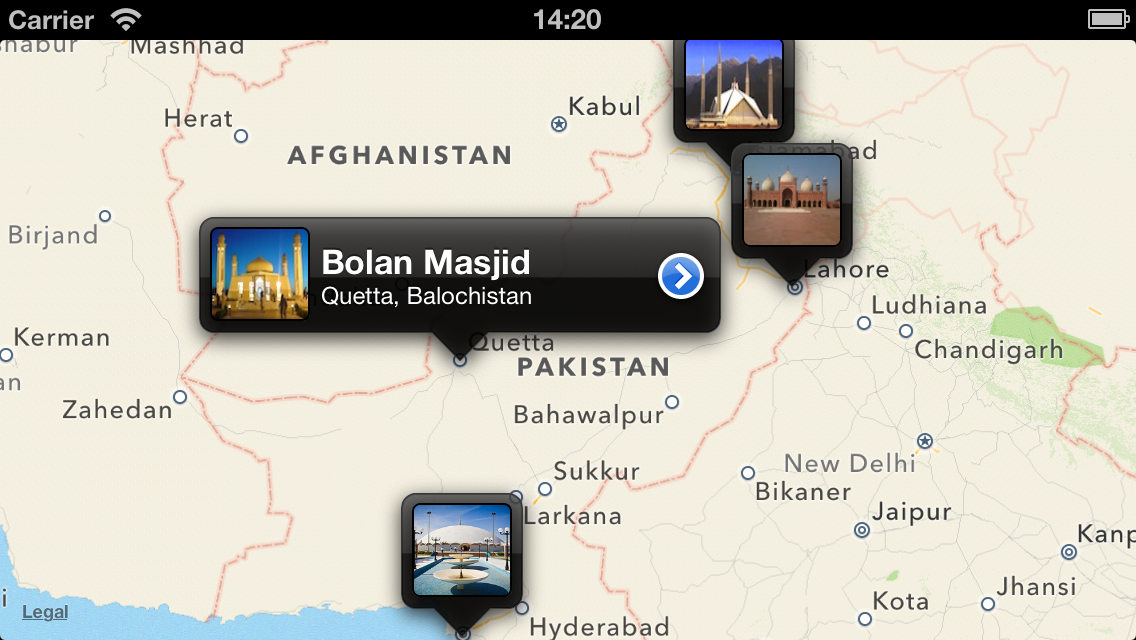
JPSThumbnailAnnotation is an open-source library to customize your MapKit annotation view for displaying image thumbnails along with title and subtitle. Here is a quick screenshot from my sample project using this library.
Setup
Its free, and open source; You need to download JPSThumbnailAnnotation library from github and drag/drop the directory into your project; You will have following six files in library;
- JPSThumbnail.h
- JPSThumbnailAnnotation.h
- JPSThumbnailAnnotation.m
- JPSThumbnailAnnotationView.h
- JPSThumbnailAnnotationView.m
- JPSThumnail.m
Usage
import JPSThumbnailAnnotation.h and add the following line of code to add one annotation on your map view
[code]
JPSThumbnail *faisaMosqueAnnotation = [[JPSThumbnail alloc] init];
faisaMosqueAnnotation.image = [UIImage imageNamed:@"faisalMasjid.jpg"];
faisaMosqueAnnotation.title = kFaisalMasjidTitle;
faisaMosqueAnnotation.subtitle = kFaisalMasjidSubTitle;
faisaMosqueAnnotation.coordinate = CLLocationCoordinate2DMake(33.72976, 73.03698);
faisaMosqueAnnotation.disclosureBlock = ^{ NSLog(@"Faisal Mosque selected"); };
JPSThumbnailAnnotation *annotation = [[JPSThumbnailAnnotation alloc] initWithThumbnail:faisaMosqueAnnotation];
[mapView addAnnotation:annotation];
[/code]
You are good to go now .. You can
download a sample project from here.

Happy Programming .. (:
 AasimNaseem


Comments
No comments yet — be the first to share your thoughts.
Leave a Reply